Showing posts with label computer literacy. Show all posts

Tuesday, April 17, 2007

Today’s Computer Literacy Lesson


Objectives: (1) To re-familiarize ourselves with blogging. (2) To create an appealing ad that shows off our best, most work-appropriate face!

Terms: Blogging, Font Style, Picture Format

Getting Started:
Advertisements are everywhere. You probably passed ten on your way to First Work today. Some you noticed, others you may have power-walked past without batting an eye. Here are some questions to help us focus on what today will be about:

  1. Think about one of the ads you can remember seeing today or in the recent past. (If one doesn't readily come to mind, choose one of the two provided below.) What was it about the ad that made you notice it?
  2. Did it appeal to your interests? If so, which ones? Why are these appealing for you?
    Did the ad you picked advertise something you were looking to buy? Did this have an impact on the ad’s effectiveness on you?
  3. How would you describe the ad's presentation? (Think about use of lines, colors, pictures, etc.) What is the role of presentation in the ad’s overall impact?

    Examples of Ads:

How you advertise yourself
In the same way as we see only the ads that appeal to us, interviewers and job recruiters will pass up all the candidates that don't show them an image that they want to see. This doesn't mean that if you're not a certain type of person from birth that you have zero chances of ever getting a job you want. What this means is that, instead, we must do a few things when we are serious about work.

  1. (Interpret) First, we need to think about your potential employer and think from his/her perspective. (Who are you trying to work for, and what are they looking for? Read into the want ad or the company and make your best guess as to what they really want.)
  2. (Reflect) Next, find the things inside you that match the image of what your potential employer wants to see--and bring that to the surface; focus on all the things that prove that you are an exact match. (Does your employer want someone who is responsible? Then focus on all the times you showed this and bring this aspect to the foreground. Does your employer want someone who is good with math? Focus on the times where you have proven that this, indeed, is you!)
  3. (Apply) Most importantly, learn to recognize where you cannot match the image of what an employer wants and act on it. (Maybe you are thinking of applying to a challenging job in public relations and don’t feel that you have enough experience in speaking to do the public speaking part well. This might mean that you decide to get some more experience before you seriously try for the job, that you decide to practice speaking with strangers, or it may mean that you need to try to find a job that better matches your needs. It’s not about being pessimistic here; it’s about being realistic!)

Today's Assignment
Moving onto today's assignment, read over these three job descriptions listed below.

*******************************
Seeking F/T security guard for high vol
clothing store in Mid- town Manhttn.
Benefits incl. Call Steve 917 XXX XXXX

*******************************
Wanted: P/T sales rep for a small internet
company. No exp req'd, but must be willing
to travel. 212 XXX XXXX.
*******************************
Seeking PT/FT wait staff for small family diner
on Upper West Side. Prev exp prefrd. Call Maria
212 XXX XXXX.
*******************************


Pick one of these three to try to "apply to" follow the following procedure.

A) Go through the three steps (Interpret-Reflect-Apply) listed above for your chosen ad, and make a list of things your employer would want, things that you can show in your experience, and things that you may need to work on for that particular job. Discuss your lists in groups. Is everyone in agreement? Did you perhaps miss anything that would be a necessary skill for your job? Did someone suggest something that you hadn't thought about? Add that to your list.

(This is the fun part:)

B) Brainstorm a posed picture of yourself that shows all those aspects that you just discussed in your group. This picture should convey something, not just show your pearliest smile. Be creative!

C) Log onto your First Work blogs and import your picture into a "sales ad" entry selling yourself! I will be around to explain how to go about this, during session, but don't be afraid to use each other as resources, too!

Links to Student “Self-Ads”:

Monday, January 29, 2007

(Workshop) Job Searching on the Internet


When you're traveling the

Information Superhighway,
are you in hyperspeed or
the slow lane?

Last week, we reviewed using the newspaper and telephone as a way to find and research jobs. In a similar way, the internet can serve as a very useful way to search and find job openings; however, many people can get mired in the large number of search results they may find.

To make the most of our internet job hunting, there are a few pointers to take into account first. Otherwise, rather than zooming to your express exit on the information superhighway, you could end up winding along a long and uneventful detour route.

Basics of Job Searching
As we learned last week, there are a few basic things that you can do to take hold of your job hunting. The first is to know what you are looking for.

Knowing what you are looking for means more than having a salary-range in mind for a position. It means knowing what you'd be willing to do for how much, where, when, and for how long. Because when we use the internet, we are able to search through want ads based on the things we want out of a job, and to save time and energy, we should do just this so that we get straight to the jobs that apply to us and avoid dud search results.

Below is a listing of some excellent web resources for web-based job hunting. Some of the sites, including the New York Job Bank, allow you to input resume data and use these resumes to narrow down searches to jobs that appeal to your resume. The NYJB also allows you to create a "Job Scout" that will check the listings on a schedule and email you results that respond to your criteria.

New York State Job Bank (Lots of great search options)
New York State Department of Labor Site (Links to many job-related sites)
Not-for-Profit Job Listings (Lots of work, but many are not entry-level)

About Craigslist

Craigslist is another great search engine for jobs that will be even more specific to part-time or temporary work in the New York City area, but because this engine is not regulated, anyone can put a posting for anything online. Because of this, the people who are in charge of Craigslist stress that it is important for users to exercise extreme judgement when making any communication online. Many of the same things to watch for when we use the classified pages in the newspaper apply to when we use Craigslist. To summarize:
  1. Never trust a potential employer that expects you to pay for training.
    This is a common trap that pyramid-schemes use to get money. They claim that you'd be perfect for their organizations, often without knowing much more about you than your name and age. Any real job wouldn't have you pay for anything but your uniform.
  2. Never respond to a want ad that sounds more like an advertisement or infomercial.
    This is a sure-fire sign of a money trap.
  3. Never respond to a want ad that is not clear about the job offered.
  4. Don't get duped by "modeling/talent agencies."
    They make most of their money from training/head-shot fees.

Keeping these in mind, Craigslist, too, is a great resource for those with the time and patience to sift through lots of dirt for a jem of a job.

Tuesday, January 23, 2007

(Workshop) Proofreading for Letter Writing


Writing is not easy. It takes lots of focus, determination, and practice to get something to come out sounding right. And usually, even if something you wrote makes sense, a little proofreading and re-writing is necessary to produce something you can be proud of.

Today we will focus on writing business letters, spotting errors in our writing, and making suggestions for revision. While the rewriting process can seem difficult if we try to do everything all at once, there are basically three things we look at when we revise something. These are listed below:


  1. The way you present your writing on paper (Style)

    Style describes how your writing looks to someone reading it. For example, if you’re writing a letter, you might ask the following questions about your style: Is the date in the right spot? Are the paragraphs indented? Is the return address in the traditional spot?

    Style is probably the easiest thing to check and correct. There are many resources in the First Work office that you can use to check your style, and you may also check your style using word processing programs like Microsoft Word.


  2. The way you put words and sentences together (Mechanics)

    Mechanics deals with all the writing rules you learned in school like spelling and grammar. Many of these things you can check using computer programs like Microsoft Word.


  3. The way you express your ideas (Rhetoric)

    Rhetoric is how you put down your ideas into words. For example, think about having to ask a friend to borrow $50. There are some ways that you can say this that would be successful and other ways that would get you a dirty look at best. Rhetoric is how you choose your words carefully to best get across your point with the desired effect. This is the hardest thing to revise because there's no set rules for how to word things.

Tuesday, October 24, 2006

(Workshop) Spending Analysis

When you make a budget for yourself, it can be like we did last week in the Financial Literacy workshop, where we worked to build a budget based on estimations about future spending, or it can be a budget to show past spending. Today at First Work, we will be taking another look at breaking down costs and making a budget in the second way--from the ground up.

You will be given a bunch of receipts showing expenses from May to October for a fictional organization. Your job is to create a spreadsheet in Microsoft Excel to chart the expenses in different categories of spending. First answer the questions below, and then try your hand at sorting and recording.

Questions

  1. What different categories of spending do the purchases seem to fall in? (Are most of the receipts from grocery stores? Are there some amounts spent for other types of purchases?)
  2. What types of information from the receipts do you think it would be necessary to fill in about the purchases? What information would be okay to omit?

Once you figure out this information, you are ready to start a spreadsheet to record information about the individual items on the reciepts.

Project Add-On

Your boss is pleased with your list, but wants two things added: she wants you to (1) Add a box to show the total spending in each of the categories, and (2) Sort your list by date.


Excel Tips

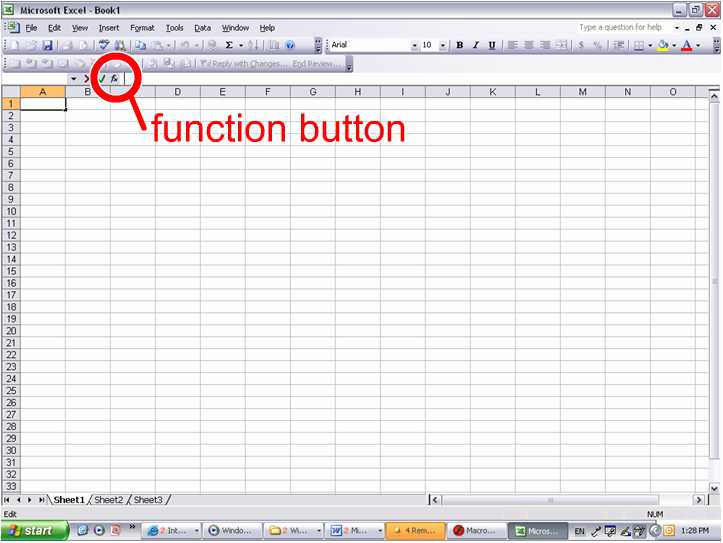
  • Remember that you can use functions in Excel to help you when you need to do some math with numbers that are already on the spreadsheet. Your hint with formulas is the location of the function button, as shown below.


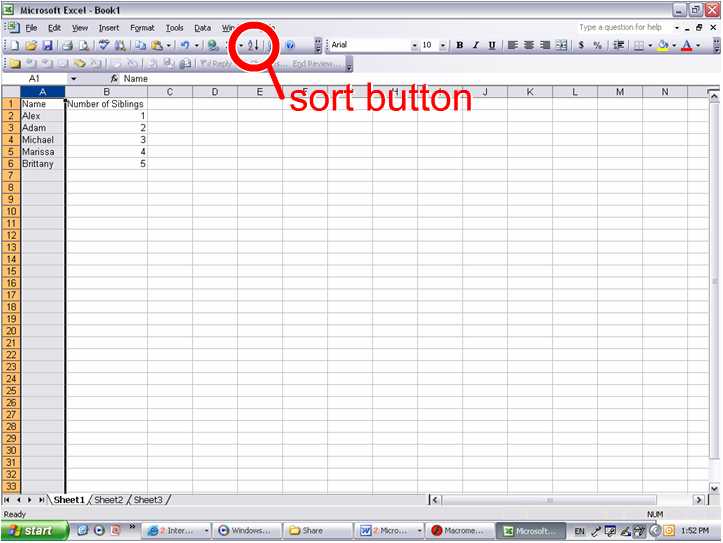
  • You can also use Excel to sort information for you automatically with the sort button. To use the sort button, you must first select the items you want to sort. The location of the sort button is shown in the picture below.

Tuesday, October 10, 2006

Blogging Perspectives/People (Continued)

Blogs, as we have seen last week, can be used in many capacities. A person can use a blog to publish journal entries, thoughts, assignments... The possibilities are limitless. And yet, there is perhaps one thing that remains true for every blog. That is, every blog is a reflection of the blogger.

* * *

Overview
Today's excercise will require that you (1) complete your Blogger profile, (2) answer the questions below as a post on your blog, (3) comment on each other's blogs, and (4) introduce each other in class.

Directions
Complete your Blogger Profile online. To do this, go to the "Dashboard" and follow the link to edit your profile. Then answer the questions below.


Questions
  1. Is this picture on its side or upside-down? Describe what this is a picture of.


  2. What do you think the artist of this collage was trying to say? Why do you think that?


  3. What picture/drawing/work of art best represents your character? (Link to an image of it if possible, or describe it for us.)


  4. What do you think is going on in the comic strip below. (Feel free to make up characters' lines.


Monday, October 02, 2006

Internet Scavenger Hunt/ Computer Literature Activity

Here is an activity to test your Internet surfing skills! Using the list below, begin to search the Internet for all the items. You must either cut and paste the items on your blogger post or type a link to the item. The person who finds the most or all the items and posts pictures of them or links to them on their blogs, will win. You will be given a time limit of 40 - 45 minutes. In addition to finding the items, you will be given a few questions to answer. Remember to do your best and good luck!


Scavenger List
  1. A Black Butterfly
  2. A child catching a ball
  3. A man in a business suit with a red tie
  4. Two dogs kissing
  5. An elephant eating
  6. A woman with an attitude
  7. A resume
  8. The business hours of the Parkchester Library in the Bronx
  9. The world champion who ate the most hot dogs in 2006
  10. The current Manhattan Borough President
  11. The baseball team who won the world series in 1974
  12. The number of schools listed in the New York City Public School system
  13. A person who has the same first name as you and their importance
  14. A black panther
  15. An Indian tribal symbol
  16. A baby crying
  17. A your favorite artist/ actor/ actress or singing group
  18. An apartment for rent ad
  19. A credit card advertisement
  20. A vacation spot

Questions

  • What item was the most difficult to find? Why?
  • What was the easiest thing to find? Why?
  • What item on the list best describes you? Why? (Use poetic devices.)
  •